Authentication providers
Configuration
Available at Configuration > Authentication providers. Each authentication provider has the following fields:
Name
Description: The name of your authentication provider
Description
Description: A fitting description of your provider (Optional)
Status
Description: Whether your provider is active or not. If not, users from that authentication provider will not be able to log in. Default: true
Authentication provider type
Description: Which type of authentication provider is this. Currently, three options are available: Google, Microsoft and LDAP. Selecting a type will show you extra settings for that particular type.
Client ID Description: Fill in the OAuth client ID you created in your Google console
Client Secret Description: Fill in the OAuth secret you created in your Google console
Microsoft
Tenant ID Description: The unique identifier of your tenant. If left blank common will be used.
Client ID Description: The identifier for the application.
Client Secret Description: Fill in the OAuth secret you created in Azure
Enable group mapping Description: Check this if you wish to use the membership of security groups in Azure to infer the group membership of a user in Factry Historian.
Group mapping type Description: Sets whether Security groups or App roles are used to determine the groups which the user is automatically added to.
LDAP
Host Description: This is the ip address or FQDN of the LDAP server to connect to.
Port Description: The port on which the LDAP service is listening
Use SSL Description: Check to enable SSL
Use TLS Description: Check to enable TLS
Skip verify SSL Description: Check to skip the verification of the server certificate if SSL or TLS is enabled
Root CA Certificate Description: If the LDAP server has SSL enabled and you are using self-signed certificates provide the full location to the trusted root CA certificate with which the server certificate has been signed. This certificate must be placed on the same server which is running Factry Historian and must be readable for the factry-system user.
Client certificate Description: If client certification authentication is enabled provide the full path to the client certificate. This certificate must be placed on the same server which is running Factry Historian and must be readable for the factry-system user.
Client key Description: If a client certificate is configured provide the full path to the key to decrypt the certificate. This file must be placed on the same server which is running Factry Historian and must be readable only to the factry-system user.
BindUser DN Description: Provide the distinguished name for the user which is used to bind to the LDAP server. For security purposes this user is best configured having read only access to the LDAP server.
BindUser Password Description: The password used to authenticate the bind user.
BaseDN Description: This is the “base distinguished name”. It is the starting point for all LDAP searches. All users which are to be authenticated against the LDAP server must be found within the directory tree beneath the BaseDN.
Search filter Description: The search filter is used to define the criteria for searching the directory for a specific set of users. For example if you wish to lookup users by their common name use (cn=%s) (%s is replaced the username on login).
The following configuration parameters are used to extract extra attributes from the LDAP users to enrich the attributes of the user in Factry Historian.
- Email Attribute Description: The name of the email attribute in LDAP
- FirstName Attribute Description: The name of the first name attribute in LDAP
- LastName Attribute Description: The name of the last name attribute in LDAP
- Locale Attribute Description: The name of the local attribute in LDAP
- MemberOf Attribute Description: This attribute is used to determine the group membership of a user. It is only used if the enable group mapping option is enabled.
- Enable group mapping Description: Check this if you wish to use the membership of groups in LDAP to infer the group membership of a user in Factry Historian.
User group mapping
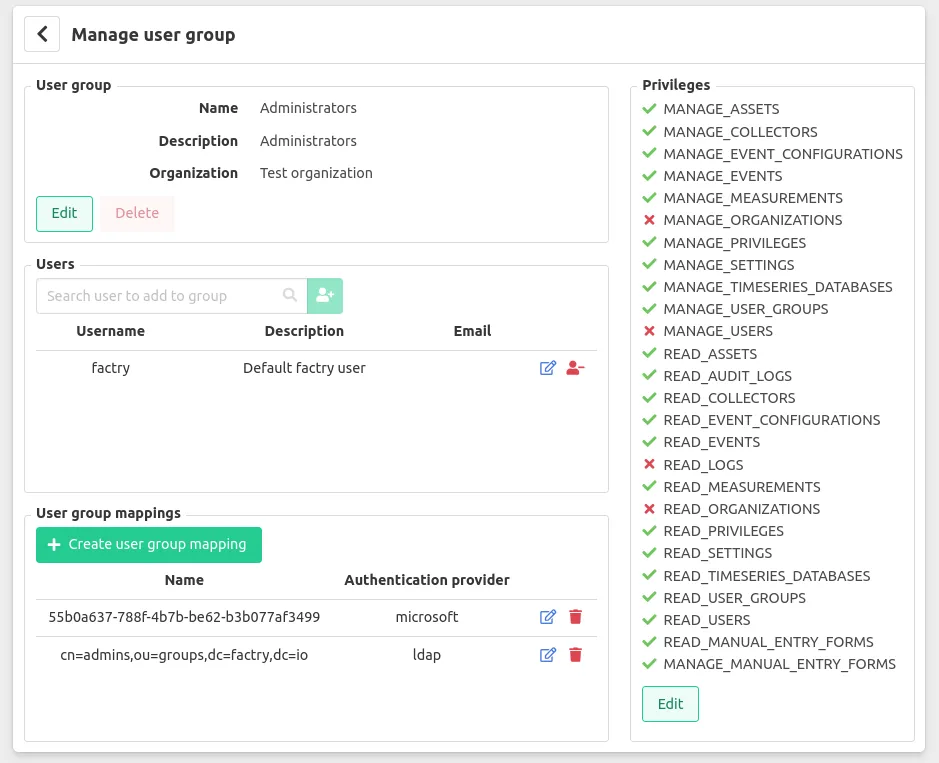
In order to authorize users according to their group membership in either LDAP or Microsoft you will have to indicate which corporate groups correspond to which Factry Historian groups. This can be achieved by editing the Historian user group you wish to map and add a group mapping. Below you can find a screenshot in which an Administrators user group has been mapped to a user group in LDAP and a security group in Microsoft Azure.
How-Tos
For more in-depth information on how to add a particular authentication provider, please consult these guides: