Configuring a REST API collector
The REST API collector in Factry Historian allows you to collect data by querying a REST API endpoint. Once configured, the data is historized and made available for further processing in Factry Historian, and for trending, reporting, and analysis.
Prerequisites
- Permissions in Factry Historian to manage collectors. See PrivilegesPrivileges .
- An installed REST API collector. If you have not done so already, first install a collector.
- A working REST API endpoint. If you are new to this, first test the endpoint and responses with Postman or follow our guide to test a REST-API connection.
- A configured time-series database to write the collected data to.
Configure the collector
After installing the collector, you should see that the collector is in an initial state and is actively running. This means that the collector has established a connection to Factry Historian and is awaiting further configuration.
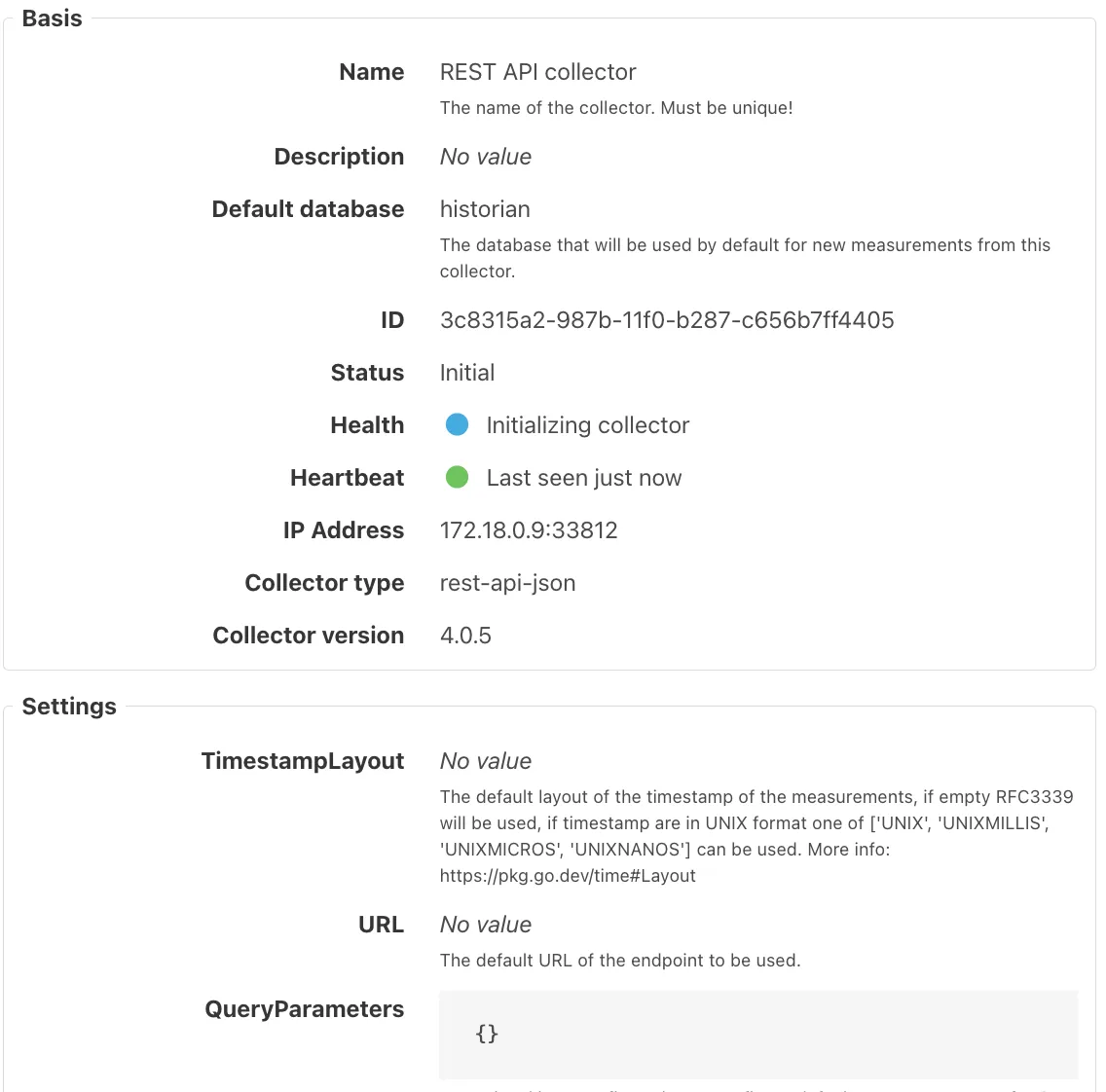
To configure the collector, select it from the Collectors overview in Factry Historian and click the Edit button. Configure the following fields:
TimestampLayout
Default parsing layout for timestamps used by this collector. If empty, RFC3339 is assumed.
Options
- (empty) → RFC3339
- Custom Go layout: e.g. "2006-01-02 15:04:05"
- "UNIX", "UNIXMILLIS", "UNIXMICROS", "UNIXNANOS"
More info on Go layouts: https://pkg.go.dev/time#Layout
Examples
URL
The default endpoint URL to be queried.
Examples
https://api.example.com/dataDo not put filter or paging parameters in Headers. Use QueryParameters (GET) or Body (POST) for parameters.
QueryParameters
Optional JSON map for GET query parameters. Include <startTime> and <stopTime> when you use windowed or historic reads.
Example (GET style)
{
  "siteId": "46",
  "start": "<startTime>",
  "stop": "<stopTime>",
  "pageSize": "500"
}
QueryParameters should contain <startTime> and <stopTime> templates. If these are not present, the collector will go into an error status.
Body
Optional JSON body for POST requests.
Example (POST style)
{
  "siteId": 46,
  "filter": { "type": "energy" },
  "range": { "start": "<startTime>", "stop": "<stopTime>" }
}
Body parameters should contain <startTime> and <stopTime> templates, if not present the collector will go into an error status.
Method
HTTP method to use.
Options
- GET (default): idempotent reads with query params.
- POST: when the API expects a JSON body or complex filters.
Headers
Optional JSON map of request metadata (authentication, tenant, content negotiation). Common uses
- Authentication: Authorization: Bearer … or Authorization: Basic <base64(user:pass)>
- API keys: X-API-Key: …
- Multi-tenant routing: X-Tenant: …
- Idempotency (some APIs): Idempotency-Key: …
Examples
{ "Authorization": "Bearer 01234567-89ab-cdef-0123-456789abcdef" }The collector normalizes content negotiation to JSON. Content-Type and Accept are set to application/json.
Do not put filters, paging, or time-window parameters here, use QueryParameters (GET) or Body (POST).
Interval
Default interval in seconds at which API requests are sent. Use -1 to leave empty.
Default: 5
Examples:
IntervalOffset
Offset in seconds, relative to the 0-th second, at which requests should be sent. Use -1 to leave empty.
Default: -1
Examples
Use an offset to align calls on clean boundaries and to stagger multiple measurements hitting the same API.
Historic settings (optional)
Defines how the collector backfills historical data. Leave empty for live-only.
Fields
- StartTimeHistoric: historic start time
- StopTimeHistoric: historic stop time (used only if start is set)
- IntervalHistoric: chunk size (seconds) for historic requests. Default: 900 (15 min)
Examples (match your TimestampLayout)
Clear StartTimeHistoric once backfill completes to avoid repeating it after a restart.
Expected outcome
After saving:
- The collector shows Running.
- When requests succeed and mappings resolve, it transitions to Connected.
- If required placeholders are missing (e.g., <startTime>/<stopTime>), status changes to Error with a helpful message in the collector history panel.
Adding measurements
Follow the guide on Adding measurements to a REST API collector.
Troubleshooting
No data returned
Wrong endpoint or missing query parameters will cause issues with collecting data.
- Double-check the API endpoint and parameters.
Historic data but no live data
Some APIs deliver data with a delay, causing the collector to miss live points and only capture them during historic runs.
- To fix this, update the LookBackIntervalsLookBackIntervals setting to also scan for new points in the past.
Invalid timestamp format
Check the timestamp layout of the response of the API and update the TimestampLayout setting of the collector accordingly.
- Check the timestamp layouts.
Authentication errors
Verify credentials and refresh tokens if needed.
Requests rejected or erroring on the latest time window
Some APIs do not allow a query stop time of exactly now() and reject the request or return an error instead of data.
- Set the StopTimeShiftStopTimeShift setting to 1 second (or the smallest shift the API accepts) so each live query ends just before the current time.
- Use a negative value only if the API expects a stop time in the future.
- This applies to live runs only. Historic runs are unaffected.
- Requires REST API collector 4.5.1 or higher. In 4.5.0 the setting shifted the start time as well as the stop time.
Note the difference with Historic data but no live data above: that case is about points arriving late and is solved with LookBackIntervals. This case is about the request itself being refused.
Best practices
- Test mappings with small result sets before scaling.
- Define shared settings on the collector to avoid duplicate API calls.
- Ensure timestamp layouts are explicitly configured for non-RFC3339 formats.
Limits
- Exceeding API rate limits may result in throttling.
- Each unique measurement override may create additional API calls.