Testing an OPC-DA connection
Step 1: Install an OPC-DA client
You need a tool to connect to and browse your OPC-DA server. Here are some free options:
Your OPC-DA server may offer a built-in explorer to browse the server without extra setup.
Step 2: Gather connection details
To connect, you'll need:
- Access to the OPC-DA server to install the OPC-DA client (an OPC-DA connection is localhost traffic only, except if dedicated OPC-DA tunnel software is installed)
- ProgID: most test clients can automatically detect this for servers on the local network
Step 3: Browse Nodes
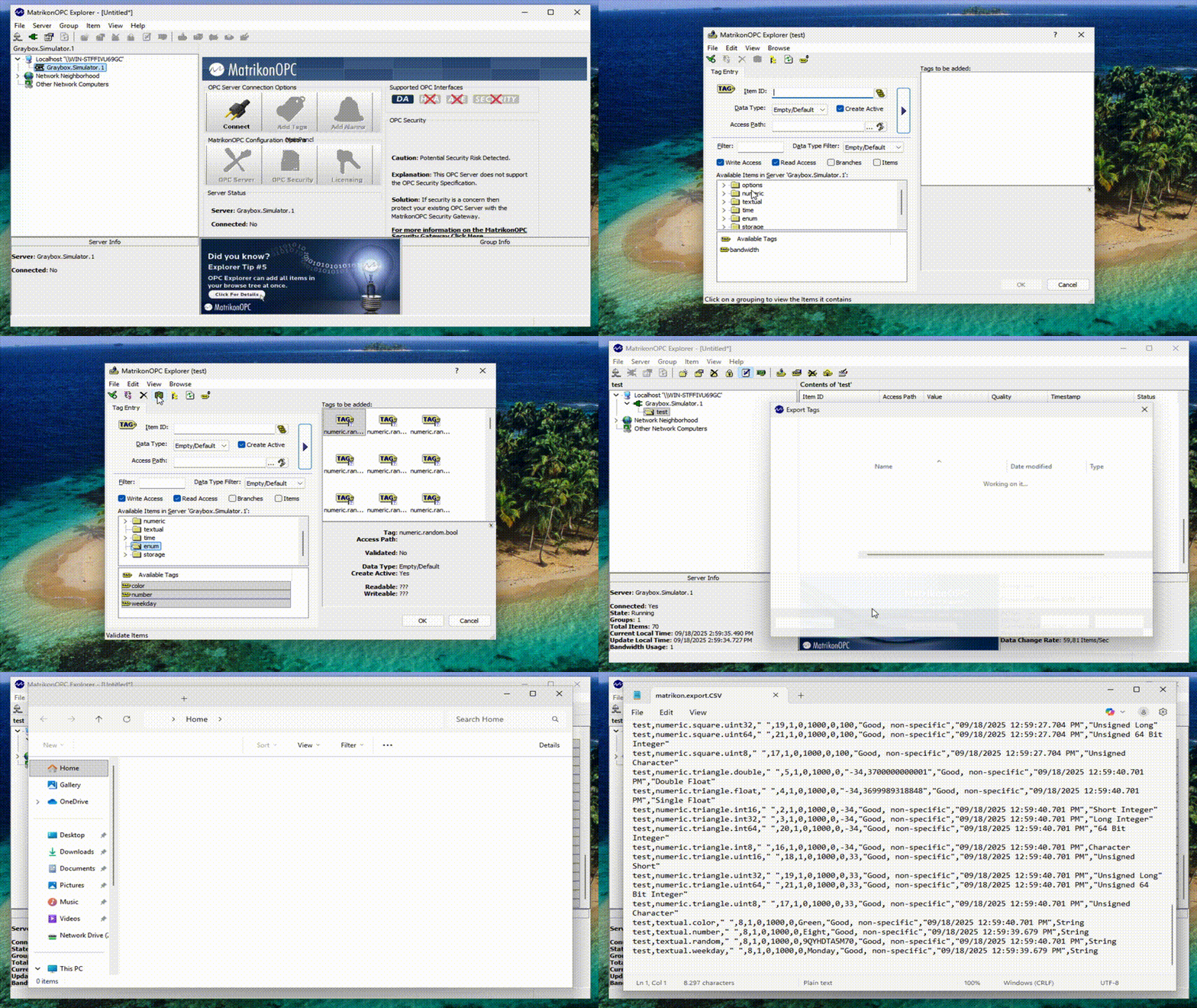
Once connected, you can browse the server to see the available OPC-DA items (with ItemID being the address), their current values, and more.
The example below shows how this works using Matrikon OPC Explorer, including how to export a list of ItemIDs to csv.
Troubleshooting OPC-DA connection
Windows OPC-DA clients only
OPC-DA is a legacy protocol that can only run on machines with DCOM technology, which is a proprietary Microsoft technology only running on Windows machines that are compatible with a 32-bit instruction set (64-bit Windows ≥ 10 machine is compatible).