Basis configuration
Title and translation
After selecting an item type, you will be asked to provide a Title. This title defines how the item will be displayed. Translations for the title can also be added so it appears correctly in different languages. You can optionally mark the item as Required. When enabled, users must provide a value for this item before completing the checklist.
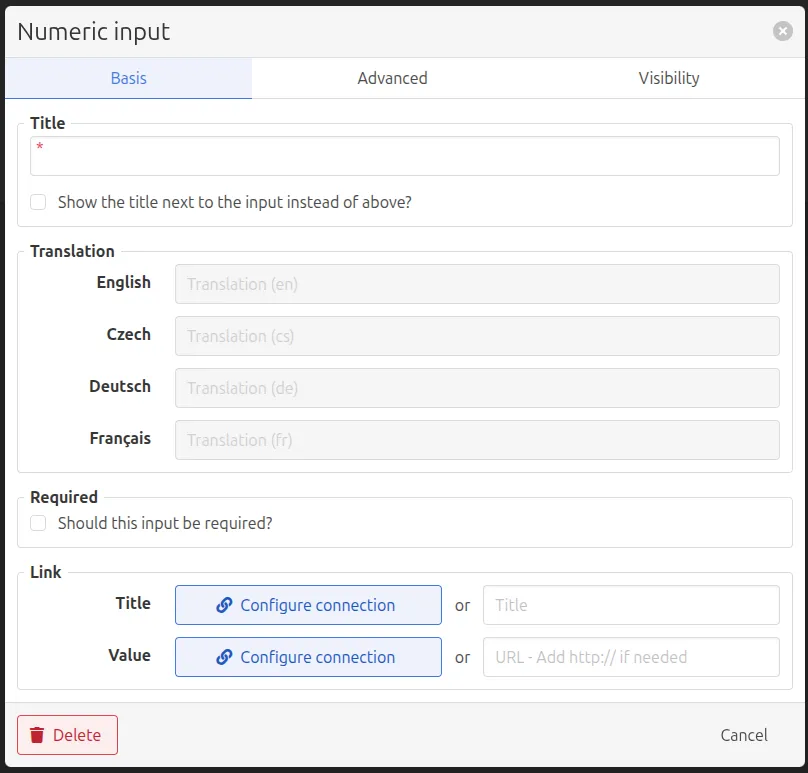
Link sections
The Link section allows additional information to be attached to a checklist item. These links provide operators with quick access to relevant resources or contextual information while executing a checklist. For example, a link will provide the operator with direct access to the Standard Operating Procedures that are centrally stored on sharepoint.
A link can either be manually defined using a custom title and URL, or dynamically retrieved from the system through a connection
Using a Connection
By selecting Configure connection, the system can retrieve information dynamically from existing system entities.
Available entities include:
- Equipment
- Order
- Entry
- Output Material Definition: the material currently being produced
- Output Lot
After selecting an entity, a specific field can be chosen (for example ID, Description, or one of its properties). The system will then automatically populate the link using that value during checklist execution.
This approach is useful when the link should adapt automatically depending on the production context.
Using a Manual Link
Instead of using a connection, a link can also be manually configured by entering a title and a URL.
This is useful when linking to resources that are not part of the system context, such as:
- external documentation
- equipment manuals
- safety procedures
- internal dashboards
Example: Link to Equipment Manual
Configuration
- Title: Machine manual
- Value: https://docs.company.com/machine-manual
Result
Operators can quickly open the equipment documentation while completing the checklist.
When to Use Connections vs Manual Links
Use Case | Recommended Method |
|---|---|
Link depends on the current order or entry | Connection |
Show contextual production information | Connection |
Link to static documentation | Manual URL |
Link to external dashboards or tools | Manual URL |